
Certification is the easy part. You answer the questions, an assessor marks them, a certificate arrives, and everyone moves on.
What you actually signed up to is different. The five controls are not a description of how your organisation looked on the day somebody filled in a form; they are a description of how it operates. Your customers rely on that. Your included insurance assumes it. And in twelve months you will be asked to declare it true all over again, against requirements that may have moved in the meantime.
So the useful question is not how to pass. It is how to still be compliant at next year’s renewal, having operated the controls for twelve months rather than reconstructed them the week before.
The five controls, and what keeps them true
Security update management: the one that slips first
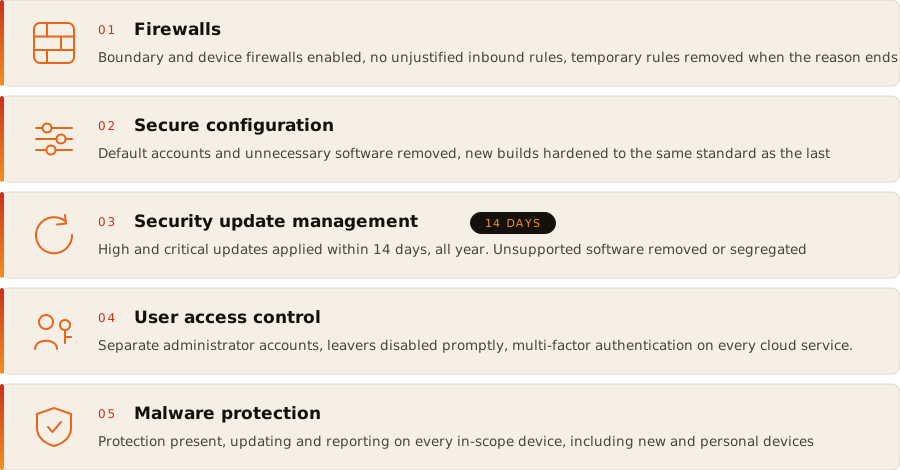
The requirement is specific. Updates rated high or critical by the vendor must be applied within 14 days of release, and software no longer receiving vendor security updates cannot remain in scope. That applies continuously, not at renewal.
Fourteen days sounds generous until you count what it covers: operating systems, applications, browsers, plug-ins, firmware where the vendor issues security updates, and every cloud-hosted service you are responsible for configuring. Miss a fortnight because someone was on holiday and the position is technically broken.
Look forward, not just backwards. The other half of this control is lifecycle. Every operating system and application has an end of support date, and those dates are published years in advance. An organisation that tracks them retires software on its own schedule; an organisation that does not gets an automatic failure at renewal for something that was entirely predictable.
Where retirement genuinely is not possible, segregation is the sanctioned answer, and it has to be technical rather than intentional.
A word on the tone of that conversation, because the industry gets it wrong. I do not share the somewhat obsessive position some security professionals take on legacy software. If an outdated or unsupported application is properly segregated from the internet, the risk is understood rather than assumed, and it is mitigated everywhere mitigation is possible, then the position is defensible. The factors that matter are the risk, the controls managing that risk, and whether the product is genuinely required with no modern alternative available. Where all three hold, the sensible response is to accept reality and manage it competently, not to lecture a business about a machine it cannot replace this quarter.
What is not defensible is unsupported software sitting on the flat network because nobody got round to it. That is not risk management, it is hope. Two worked examples of the difference:
The machine that runs the old application. A manufacturer with a computer numerical control machine whose controller software only runs on an operating system that stopped receiving updates. Put it on its own VLAN, block inbound and outbound internet access at the boundary of that subset, and the rest of the organisation can still certify as whole organisation. Leave it on the flat network and it fails the assessment for everybody.
The legacy line of business server. An accountancy practice with an old practice management server nobody can replace mid-year. Firewall it into a subset, restrict which machines can reach it and on which ports, remove its internet access, and document the boundary clearly. Then put a date in the diary to retire it, because segregation is a control, not a cure.
Our scope guide covers how subsets are described and where whole organisation status survives.
User access control: separation and multi-factor authentication
Two things sit here and both drift quietly.
Separate administrator accounts, everywhere. Administrative accounts must be distinct from the accounts people work in day to day, and must not be used for email or web browsing. That applies to devices and to every cloud service you hold administrative access in, not only the obvious one: the firewall, the backup platform, the website host, the accounting package, the domain registrar. We covered the principle across all of them in administrator account security, and the Microsoft 365 specifics separately in administrator account security in Microsoft 365.
Multi-factor authentication on all cloud services. Not just email. Every cloud service in scope: the accounting package, the customer relationship system, file sharing, the project tool somebody signed up for. New services appear throughout the year and arrive with authentication switched to whatever was easiest during the trial.
And the housekeeping that keeps both true: leavers disabled promptly, access reviewed against what the job actually needs, and accounts created during the year set up to the same standard as the ones that existed at assessment.
Firewalls, secure configuration and malware protection
Less dramatic, equally capable of drifting.
Firewalls. Boundary and software firewalls enabled, no inbound rules without a documented business case, and temporary rules removed when the temporary reason ends. The port opened for a supplier’s engineer in February is the one still open in November.
Secure configuration. Default accounts removed or renamed, unnecessary software and services removed, auto-run disabled. The risk here is new machines: a build standard applied in January and quietly ignored by the laptop bought in a hurry in July.
Malware protection. Present, updating and reporting on every in-scope device, including devices bought since certification and personally owned devices that fall in scope.
The bit where organisations discover they’re not patched
Every assessment includes a version of the same exchange. The client is confident. Patching is handled, updates are automatic, the provider takes care of it.
On one assessment that produced over 1,500 vulnerabilities, the oldest dating back to 2019. Not exotic ones: known, published, fixed years earlier, sitting on live systems the organisation used every day. Nobody was lying and nobody was negligent. Automatic updates were genuinely on. They simply did not cover everything, nobody had ever checked what they missed, and there was no mechanism that would have told them.
That reaction is worth describing honestly, because it is the normal one: they were not pleased. Discovering a four-figure backlog is unpleasant regardless of how politely it is presented.
The important part is why it happened, because it is structural rather than a failure of diligence, and because it determines how you ameliorate it.
- Operating system updates are usually automated. Third-party applications frequently are not.
- Automation reports what it installed, not what it failed to install, and a device that has been offline for six weeks reports nothing at all.
- Firmware and network equipment sit outside most update mechanisms entirely.
- Nobody notices the machine that stopped checking in, because silence looks identical to success.
So how do you actually know?
You can do it manually. Build an asset inventory, track every product’s version, monitor vendor advisories, compare them against what you have, work out what applies, then verify the fix landed. For a handful of machines that is achievable. Beyond that it is hours a week of skilled time producing a snapshot that is out of date by Friday.
Or you use software built for the job. A vulnerability management programme scans your estate on a schedule, identifies what is present and what is missing, rates findings by severity, and tells you how long each has been outstanding against your 14 day obligation. It is the only practical way to answer the question a certification assessment, a customer questionnaire or an insurer will eventually ask: how do you know?
In house, with what you already own. Before buying anything, check what your existing licences include. Microsoft 365 Business Premium bundles Defender for Business, and its vulnerability management component will inventory software, flag missing security updates and highlight weak configurations across every onboarded device. Plenty of organisations are paying for that today and have never onboarded a machine to it. Our guide to what Business Premium actually includes covers the rest of the bundle.
In house, with a dedicated tool. Where the estate extends beyond what Defender covers, or you want authenticated scanning across servers, network equipment and appliances, Qualys and Tenable Nessus are the obvious names and both are perfectly capable. What determines whether that investment pays is not the licence, it is having someone competent to configure it properly, interpret what it returns, separate the findings that matter from the noise, and act on them every week. A scanner produces data. A qualified practitioner turns that data into a decision about what to fix first, and that judgement is where the value sits.
Outsourced. Have someone else run the programme, validate what it finds, remove the false positives and hand you a prioritised list of what actually needs doing, with evidence for your certification file. That is what our vulnerability management service does, and the argument for it is the same one: you are buying the interpretation and the prioritisation, delivered by someone who does this professionally, rather than a subscription and a dashboard nobody has time to read.
I do not know how an organisation of any size can credibly claim to manage technical vulnerabilities without something that tells them what is actually present in their environment. Not what should be there, not what was installed last time somebody looked. What is there now. Everything else is an assumption wearing a certificate. And if you hold Microsoft 365 Business Premium, you are already paying for a capable part of the answer: Defender for Business includes vulnerability management, listing missing updates and weak configurations across onboarded devices. It is included. It simply has to be turned on, onboarded and then actually read.
A rhythm that works
- Continuously: scanning running, alerts going somewhere a person reads.
- Weekly: review new high and critical findings, start the 14 day clock deliberately rather than discovering it later.
- Monthly: check for new cloud services and new devices, confirm multi-factor authentication and malware protection on both, confirm nothing has been added to the estate unnoticed.
- Quarterly: review accounts and administrative access, remove leavers and privileges no longer needed, check firewall rules against their business cases.
- Annually, six weeks before expiry: the full pre-renewal review, covered in Cyber Essentials renewal.
None of that is difficult. It is simply the difference between a certificate that describes your organisation and one that describes a Tuesday in March.
Where to start
A one-off assessment shortly before renewal tells you where you stand on that day, and there is a version of this industry that sells exactly that: pass, forget, repeat next August. For an organisation that takes the scheme seriously, continuous vulnerability management is not an upsell on top of certification, it is what certification is describing. The requirement is a fortnight, every fortnight, for twelve months. It is fairly incontrovertible that you cannot meet a rolling 14 day obligation with an annual look.
So if you hold Cyber Essentials and have never independently checked what your estate actually contains, start with a vulnerability assessment to establish the position, then keep it current with a programme rather than repeating the exercise once a year.
Get in touch or call 01722 445972. As a licensed certification body we can tell you what would fail today, and as a security consultancy we can help you make sure it does not.